Author's Note: Many modern smartphones now include AI-powered editing features such as object removal, generative expansion, and image reframing. While these tools may be useful, this section focuses on creating the strongest possible photograph at the moment of capture using the smartphone's computational photography system.
By 2021 smartphone camera makers moved en masse to computational photography, eschewing the mechanical, pixel-driven, single-shot camera systems that had gone before. The smartphone camera system became, and continues to be, the most advanced and reliable mass-market photographic system ever designed. As such, it is an imaging system that requires some changes in the approach to “making pictures”.
The problem is that any number of sources continue to treat the smartphone camera as that mechanical, pixel-driven, single-shot system from the now-distant past. Here is the practical, real-time guide to using the smartphone camera --
The first thing to realize is that the smartphone camera has five modes that give you the full computational process. These modes are Photo, Night, Portrait, Burst and Panorama. Using the “Pro” mode built into the stock camera app on an Android phone or a third party camera app on either an iPhone or an Android phone pulls the photograph out of the pipeline very early in the process, defeating all of the advanced technology, giving you inferior output.
The photograph below was taken using an Apple iPhone 15 Pro Max in Night Mode.

Smartphone camera systems can handle the trickiest lighting situations, highly articulated and complex scenes, finely detailed materials or the subtlest of color shadings because they are not relying on a fixed processing sequence but rather on flexible computational recognition of the scene in total and an interpretation of what is needed to give you the best rendering of that scene. In a sense, these camera systems “know” what they are looking at and “understand” that they are tasked with giving you the best photographic version of that scene possible... on their own.
The other thing to understand is that the image the camera is showing you on the display is a lower resolution preview and not the final, fully processed photograph. Not that the image will be drastically changed in the final output but the imaging process will refine the photograph for the highest quality output possible as it is being processed.
In conventional photography a lot of time and effort is given to setting the correct exposure. This includes everything from setting the ISO to adjusting the shutter speed and aperture, working back and forth between the exposure meter and the histogram. And it’s almost as time and effort consuming if you are using either shutter priority or aperture priority.
When you are in any of the computational photography modes on your phone you needn’t worry about setting an exposure level as the system handles all of the scene assessment, sets the ISO, the shutter speed and all of the other parameters while the preview image is appearing on the display. (Don’t forget that the aperture is fixed on smartphones although there has been some experiments with a two-stage variable aperture.)
The smartphone camera is a multi-frame system meaning it almost instantly takes a number of different frames of the scene at different exposure levels to use in constructing the final photograph. The final output is a composite of all the frames taken. That compositing happens from the global level to the granular level.
As the photographer, you can control the entire system with the screen tap. By tapping the screen at any specific point in the composition you control both the focus and exposure reference point. This is the element in the composition that keys the exposure and most often this is an area in the highlights you want to preserve.
The second screen tap function is the tap and hold. This gives you an auto exposure / auto focus lock so you can recompose the photograph but keep the focus and exposure at the point set by the tap.
We still read and hear the old adage advising smartphone photographers to “zoom with your feet” implying that the zooming capability of the camera is limited. The issue, however, is not just how far a telephoto can reach. It’s the range of focal lengths the particular camera system can cover with acceptable results. The photograph below, the lens board, lens and exposure controls of a 1914 Kodak Pocket 3A (unrestored), was taken hand held at a distance of about 8 cm from the subject with an iPhone 15 Pro Max.
This photograph below, a hot air balloon in flight, was taken, also hand held, with the same iPhone 15 Pro Max set to its maximum zoom, a 35mm equivalent of 667mm.
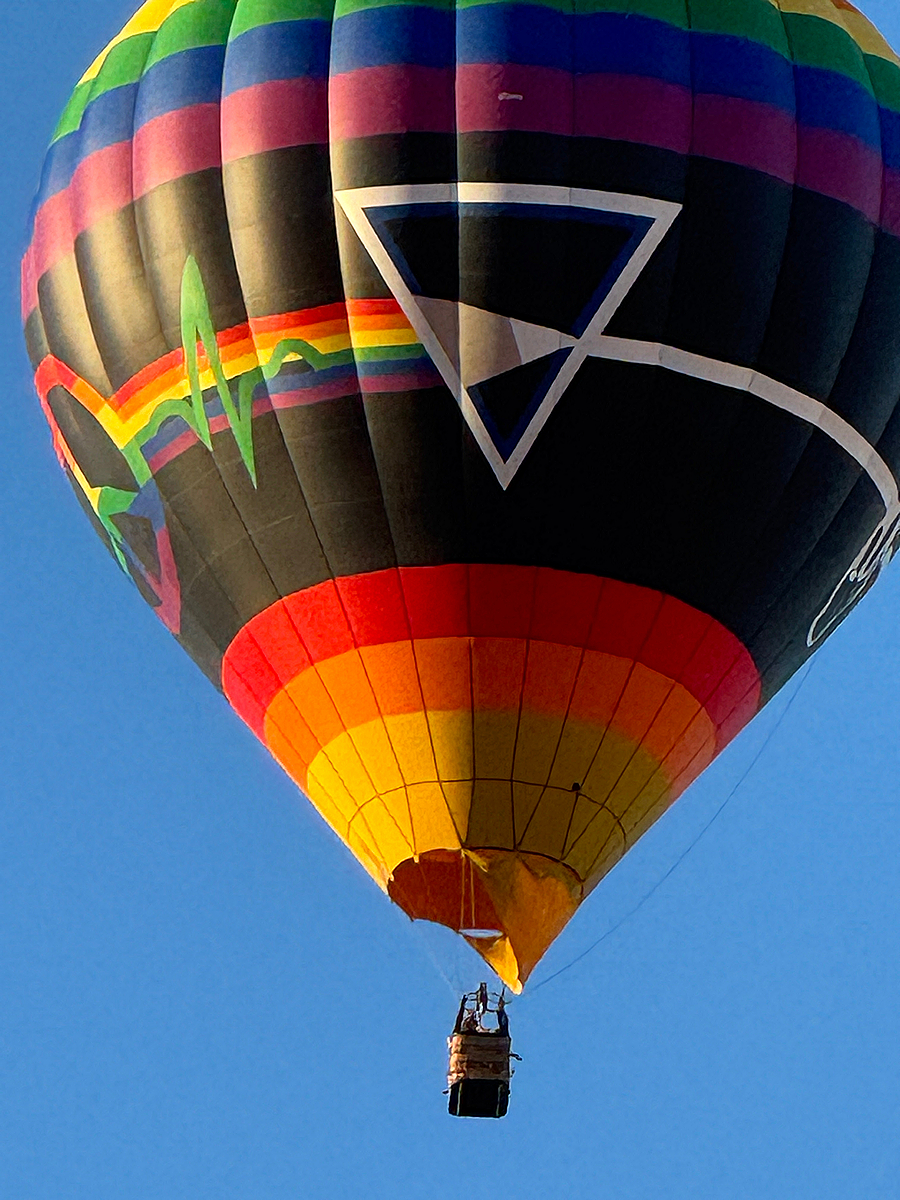
Both photographs are more than just usable. While the balloon photograph has some noise issues, you still have significant detail, to the point you can see the texture of the weave in the basket carrying the pilot.
It appears the old "zoom with your feet" adage is no longer an issue. Note that both photographs were taken in the camera’s Photo mode.
The fully computational output of the system is a JPEG file. This is not just JPEG compression applied at the end of the processing, simply squishing the photograph to a preselected size. The system is aware of the JPEG output very early in the processing pipeline and assures that the image is fully tailored for that “wrapper”. Dynamic range, tonal mapping, global and local HDR mapping, global and local contrast assessment, color accuracy based on the preview, noise reduction, etc., are all done with “acknowledgment” that the fully formed JPEG format is the system-standard computational output and the fully formed photograph needs to fit completely in that “wrapper”, from deepest shadow to brightest highlight and every range in between.
Smartphone cameras will provide “raw” files but with several caveats. The ProRAW file from Apple is not a traditional raw file. It has had some processing applied. The computational raw file from the Google system is also partially processed. Samsung, Motorola and other Android-based smartphone systems, provide a straight DNG for the raw file, bypassing most of the computational advantages.
A major advantage of the fully formed JPEG comes in the post processing area where most of the adjustments made are minor tweaks Much of the work that once happened later in Photoshop or a RAW editor now happens automatically inside the camera before the photograph is even saved. As a result, the exported JPEG is often already a fully finished photograph. If adjustments are needed for some reason they are only minor presentation adjustments rather than the wholesale bludgeoning needed for RAW data.
The further implication here is for the software and the work station. Because much of the processing labor has already been collapsed into the capture system, a heavy desktop or laptop workflow is no longer necessary. Meaning that much lighter software such as Faststone Image Viewer or digiKam can be used for processing and hardware requirements are significantly eased as well. To put it bluntly, you no longer need a Hollywood-production-class work station.
Please see Impact: You Really Don’t Need All That Stuff For Post Processing on this website.
In short, because much of the processing labor has already been collapsed into the camera, the photographer’s job is no longer to manually construct an image from raw technical data but to recognize moments, organize compositions and direct the camera toward the story being told. What all of this means is you have far more time (and energy) to concentrate on the actual storytelling in your photography!
All of the articles on this website are contained in the downloadable white paper "Operationalizing the Language of Photography for Effective Storytelling". To download the paper, click here.